
Your team already has the data. It's just trapped in the wrong places.
A campaign drives a demo request. Sales replies with a custom proposal in PDF form. Legal redlines the contract. Finance sends an invoice. Customer success logs onboarding questions in support tickets. Marketing sees pieces of the journey, but not the whole thing. The result is familiar: manual copy-paste, broken attribution, missing fields in Salesforce, and endless debates about which channel influenced revenue.
Most B2B SaaS teams don't have a lead shortage. They have a context shortage. The signal is sitting inside contracts, emails, forms, invoices, call transcripts, and support documents. But because those assets aren't structured like a database, they rarely make it into the systems where growth teams work.
That's where document analysis becomes useful. Not as an academic exercise, and not as a vague “AI” promise, but as a practical way to turn messy business documents into usable data. When you do it well, a renewal date in a contract can enrich an account record. An implementation note can explain churn risk. A billing document can tighten revenue attribution. A support thread can reveal onboarding friction by segment.
If you're trying to build a cleaner revenue picture across marketing, sales, and product data, this connects directly to the same challenge discussed in a marketing data unification guide for B2B teams. Documents are often the missing layer between what happened and why it happened.
Table of Contents
- From Document Chaos to Strategic Insight
- What Is Document Analysis in a Business Context
- The Core Techniques Unpacked
- How Documind Can Help
- Building Your Document Analysis Workflow
- Key Use Cases for B2B SaaS Teams
- Measuring Success and Ensuring Data Quality
- How to Get Started with Document Analysis
From Document Chaos to Strategic Insight
A demand gen leader launches campaigns across LinkedIn, Google, and partner channels. Pipeline starts moving. But the handoff gets messy fast.
The lead source is captured in one system. The buying committee details sit in a proposal PDF. Contract value changes during procurement. Billing terms land in finance software. Product usage notes live somewhere else. By the time leadership asks which campaigns influenced expansion revenue, the team has three spreadsheets and five opinions.
That's not a tooling problem alone. It's a document problem.
The hidden revenue data in plain sight
Most go-to-market systems are built for structured fields. They want neat inputs like company name, ARR band, contract start date, renewal date, plan tier, and industry. Business documents don't arrive that way. They arrive as:
- Sales documents such as order forms, MSAs, SOWs, and procurement questionnaires
- Marketing inputs like webinar registrations, event scans, partner referral emails, and free-form lead forms
- Finance records including invoices, purchase orders, and payment confirmations
- Customer documents such as onboarding notes, implementation summaries, and support exports
A person can read these quickly and spot meaning. Software usually can't unless you give it a process.
Practical rule: If an important customer signal appears in a PDF or long text field, and nobody maps it into your CRM or warehouse, your reporting will stay incomplete.
Why this matters for growth teams
Messy documents create quiet failure points. Revenue attribution misses contract changes. Lifecycle reporting breaks when key fields never get entered. Segmentation weakens because firmographic or product context stays buried in attachments.
Document analysis solves for that by creating a repeatable way to inspect documents, pull out important facts, and turn them into structured records your team can use. In a B2B SaaS environment, that means fewer blind spots between marketing touchpoints and revenue outcomes.
It also changes how teams think about documents. A contract stops being “just a PDF.” It becomes a source of renewal timing, commercial terms, product scope, and account-level intelligence.
What Is Document Analysis in a Business Context
Document analysis means reviewing documents in a structured way so you can extract meaning, identify patterns, and use what you learn to make decisions.
That idea comes from qualitative research. In its original form, document analysis is a systematic method for examining materials to interpret meaning and identify patterns. The process includes defining a question, choosing documents, organizing them, and analyzing them with techniques like content coding and comparison to draw conclusions, as described in ATLAS.ti's overview of document analysis.
A digital librarian for your revenue operations
The easiest way to think about this in business is as a team of fast digital librarians.
They don't just store documents. They read them, sort them, highlight important details, and file those details where the rest of the business can use them. One contract gets tagged with renewal date and pricing model. A batch of onboarding notes gets grouped by implementation issue. A stack of invoices gets matched to account records.
That's document analysis in business form.
It isn't only about reading words on a page. It's about answering business questions such as:
- Which contracts renew this quarter
- Which inbound forms mention a buying timeframe
- Which invoices belong to accounts influenced by paid media
- Which support documents mention the same onboarding blocker
It's not the same as document storage
Readers often get mixed up at this point.
A document repository like Google Drive, SharePoint, or Dropbox stores files. A search tool helps you find them. A document analysis workflow does something more valuable. It converts document content into structured insight.
Here's the difference in plain language:
| Business activity | What it means |
|---|---|
| Storage | Keeping the PDF somewhere safe |
| Search | Finding the PDF when you need it |
| Analysis | Pulling out facts, themes, and signals from the PDF |
| Integration | Sending those facts into your CRM, warehouse, or reporting layer |
Why business teams care
For a marketer, the “so what” is simple. Better document analysis creates better context around the customer journey.
If your CRM only knows that an opportunity closed, you have one kind of story. If your CRM also knows the final contract term, the implementation scope, the billing cadence, and common onboarding friction from attached documents, you have a much more useful story. That improves segmentation, attribution, lifecycle reporting, and account planning.
Documents are unstructured by default. Value appears when a team decides what question matters, then extracts only the fields and themes that help answer it.
That last point matters. The goal isn't to analyze every document in your company. The goal is to analyze the right documents for a clear business purpose.
The Core Techniques Unpacked
The technology behind document analysis can sound intimidating. It doesn't need to be.
Most modern systems combine a handful of techniques. Each one handles a specific job, much like a relay team. One converts a file into readable text. Another interprets language. Another identifies the facts you care about. Another sorts the document into the right category.
A simple way to think about the stack
Here's the practical breakdown.
| Technique | What It Does | B2B SaaS Example |
|---|---|---|
| OCR | Converts scanned or image-based documents into machine-readable text | Turns a signed contract PDF into text your system can process |
| NLP | Interprets language, sentence meaning, and context | Detects whether a customer note describes a feature request or a support issue |
| Entity extraction | Finds named items such as companies, dates, amounts, products, or terms | Pulls company name, renewal date, and billing terms from an agreement |
| Document classification | Assigns a document to a type or category | Labels a file as invoice, proposal, contract, support note, or compliance form |
| Automated summarization | Produces a concise overview of a longer document | Creates a short brief of a long procurement response for sales and marketing |
OCR turns pages into usable text
Optical character recognition, or OCR, is usually the first step. If a document is a scanned image, your software can't really analyze it until the text becomes readable.
Think of OCR as turning a photo of a page into copyable text. Without it, your contract is just pixels. With it, the system can inspect clauses, dates, names, and terms.
For a SaaS team, this matters whenever documents come in as signed PDFs, screenshots, or exports from external systems.
NLP helps software read like a person would
Natural language processing, or NLP, helps software interpret language instead of just spotting keywords.
A keyword-only system might flag every mention of “renewal.” An NLP-driven system has a better chance of recognizing whether the document says the agreement auto-renews, whether the customer declined renewal language, or whether renewal is under legal review.
That's why NLP feels so useful in support and onboarding documents. People don't write in clean database fields. They write in sentences, fragments, and shorthand. NLP helps extract meaning from the mess.
If you want a broader primer on how these systems work in growth workflows, this explanation of machine learning for marketing is a helpful companion.
Entity extraction finds the facts worth keeping
This is often the highest-value step for operations teams.
Entity extraction identifies specific pieces of information inside text. In B2B SaaS, that usually means things like:
- Account details such as company name, contact name, and location
- Commercial terms like contract start date, renewal date, billing cadence, and payment terms
- Product context including SKU, plan name, seats, implementation scope, or service tier
- Buying signals such as urgency language, competitor mentions, or procurement status
If OCR gives you readable text, entity extraction gives you the structured fields you can map into Salesforce, HubSpot, Snowflake, or BigQuery.
Classification keeps the workflow organized
Before you extract information, it often helps to know what kind of document you're looking at.
A proposal and an invoice may both mention company names and prices, but they serve different purposes. Document classification lets your workflow route files correctly. Contracts can go to legal review logic. Invoices can go to revenue matching logic. Support exports can go to theme analysis.
This is the operational version of triage.
Summarization helps teams move faster
Long documents slow people down. Automated summarization creates a shorter version so a marketer, AE, or rev ops manager can understand the key points fast.
Used well, summarization is a time-saver. Used badly, it becomes a source of risk because summaries can omit nuance. That's why strong systems pair summaries with citations or direct links back to the source text.
Where teams usually get confused
The common mistake is assuming one technique does everything.
OCR doesn't understand meaning. NLP doesn't always produce clean structured fields. Classification doesn't verify truth. Summarization doesn't replace review. Good document analysis stacks these capabilities together, then sends the output into a human-reviewed workflow when accuracy is critical.
Treat document analysis like an assembly line, not a magic trick. Each technique handles one part of the job.
How Documind Can Help
Some teams don't need to build a full custom pipeline on day one. They need a faster way to work with PDFs now.
That's where a tool like Documind fits. Its document analysis guide is useful if you want another plain-English explanation of the category, but the more important point is what the product does in practice. Documind turns PDFs into a conversational workspace where users can upload one file or many, ask questions in natural language, extract facts, generate summaries, and trace answers back to source pages.
When a PDF workspace is the right fit
Documind makes sense when your team spends too much time manually reading documents but isn't ready to engineer a large internal system.
Examples include:
- Research-heavy work where marketers or analysts need to compare information across many PDFs
- Compliance review where teams want quick answers with citations back to the original page
- Content workflows where long reports, briefs, or manuals need summaries and draft generation
- Customer-facing knowledge access where a document-trained chatbot can answer questions from shared files
The product also supports bulk uploads, folder organization, multilingual analysis, API access on higher plans, and shareable chatbots trained on uploaded documents. That combination is useful when the bottleneck is access and speed, not just extraction.
Where it helps most
Documind is especially strong when the source of truth is still the document itself.
If your team needs verifiable answers from PDFs, citations matter. If you need quick synthesis across multiple documents, conversational search helps. If you want to reduce hours spent skimming contracts, manuals, reports, or procurement files, summarization and question-answering can save time.
It's less about replacing your CRM and more about making static files easier to query before you decide what should flow into other systems.
The best use of a PDF analysis tool is often upstream. First, help people understand the documents. Then decide which extracted fields deserve a permanent home in your systems.
Building Your Document Analysis Workflow
A strong document analysis workflow works like a sorting and routing system for revenue signals. Files come in as unstructured text. What your team needs is clean, usable data that can update account records, feed the warehouse, and support better decisions across marketing, sales, and customer success.
The starting point is not the model. It is the business question.
Start with a business question
If the question is broad, the workflow will sprawl. If the question is specific, the workflow gets easier to scope, test, and improve.
A marketing leader usually cares less about "analyzing documents" in the abstract and more about a practical outcome. Can we pull buying signals out of inbound attachments? Can we capture contract terms that explain expansion or churn? Can we enrich attribution reports with commercial context that never made it into the CRM?
Good starting questions for B2B SaaS teams include:
- Renewal visibility so customer success and finance can forecast with current contract data
- Attribution enrichment so marketing can connect document-level context to pipeline and revenue
- Lead qualification so sales can capture urgency, scope, and stakeholder clues from inbound text and attachments
- Onboarding insight so product and success teams can identify repeated implementation friction across forms, tickets, and statements of work
Each question points to a field, a system, and an owner. That is what keeps the workflow grounded.
Move from raw files to usable records
Teams often end up following the same pattern, whether they start with contracts, invoices, intake forms, or support exports.
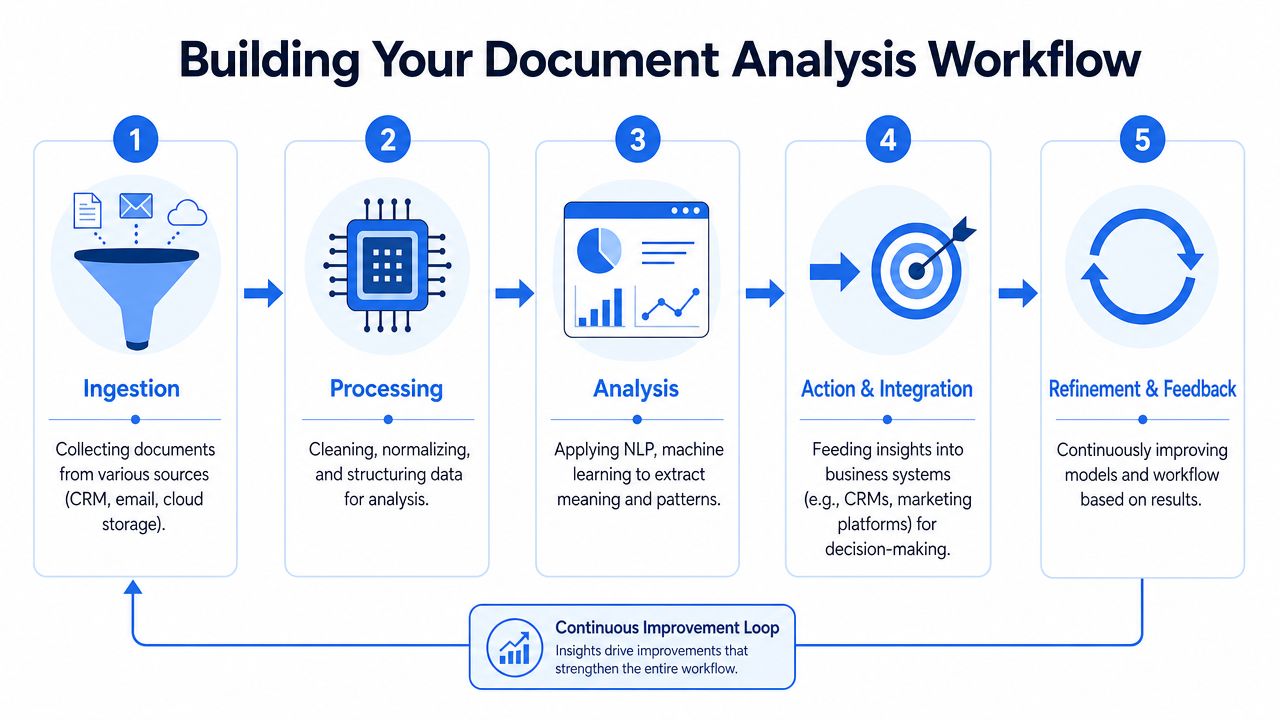
Ingestion
Documents arrive from email, cloud storage, e-signature tools, billing platforms, support systems, and CRM attachments. Start by attaching a few basic labels to every file: source, timestamp, owner, account, and document type if you know it.
That sounds simple, but it solves a common downstream problem. If extracted data cannot be tied back to the right account or opportunity, the output may be accurate and still fail to help anyone.
Processing
Next, prepare the files so the analysis step has clean input. That often includes OCR for scanned pages, duplicate removal, file naming cleanup, language detection, and splitting large files into smaller records.
This stage is like prepping ingredients before cooking. If three contracts are bundled into one PDF, or half the text is trapped in an image, extraction quality drops before the model even begins.
Analysis
Now the system can identify and structure what matters. That may include extracting dates, pricing terms, product names, contact roles, competitor mentions, implementation deadlines, or reason codes. It may also include classifying document types, summarizing long sections, or grouping repeated themes.
The goal is not to create a clever summary. The goal is to create data your operating systems can use.
A good test is simple. If the output cannot map to a CRM field, a warehouse table, an alert, or a report, it is probably still too vague.
Action and integration
At this stage, many projects either become valuable or stall.
The extracted output needs a destination:
- CRM enrichment with renewal dates, contract terms, product lines, billing contacts, or approval roles
- Warehouse sync so analysts can join document data with campaign, product, support, and revenue events
- Marketing attribution support by adding commercial context from agreements, invoices, or intake documents to the customer journey
- Routing and alerting so sales, success, or finance teams know when a document contains a high-priority signal
For B2B SaaS teams, this integration step is the difference between a document tool and a revenue data asset. A contract date sitting in a PDF helps one person. The same date, written to the CRM and modeled in the warehouse, can improve renewal forecasting, lifecycle reporting, and attribution analysis across the whole team.
Refinement and feedback
No workflow stays accurate without review. Teams change templates. New document types appear. Fields that mattered six months ago stop being useful, and missing fields suddenly matter a lot.
Set up a simple correction loop. When a rep fixes a contract term, or an analyst spots a misclassified onboarding document, that correction should feed the next version of the workflow. Over time, the system gets better because your team is teaching it what "right" looks like in your business.
Add validation before you automate downstream actions
This is the control layer.
It is tempting to pipe extracted values straight into Salesforce, HubSpot, or the warehouse as soon as the first tests look promising. That creates risk fast. A wrong renewal date can distort forecasts. A misread pricing term can skew expansion reporting. A missing stakeholder can weaken attribution and account scoring.
Validation does not need to be complicated:
- Check high-risk fields first such as contract dates, pricing terms, billing details, and legal obligations
- Compare extracted values with existing records when a source of truth already exists
- Flag low-confidence outputs for human review instead of auto-writing to core systems
- Store source references so every important field can be traced back to the original text and page
A practical workflow treats document analysis the way finance teams treat imported data. Trust is earned before the record gets used in reporting, routing, or automation.
That is how messy documents become useful system inputs, not just searchable files.
Key Use Cases for B2B SaaS Teams
The best way to judge document analysis is by what it fixes inside a real go-to-market workflow. Not the theory. The handoff problems.

Lead capture from messy inbound documents
A paid campaign drives an inbound lead. The form includes a free-text box that says, “Need to replace current vendor before Q4. Multi-region rollout. Legal review required.” The attachment includes an RFP document and a signature block with extra contact details.
Without document analysis, the CRM might capture only name, email, and company.
With document analysis, the team can extract urgency, rollout scope, buying signals, and additional stakeholders. That changes lead scoring and sales routing right away. Marketing also gets richer data for attribution analysis because the account record now contains more than just the original source.
A simple win here is parsing inbound PDFs and long text fields into structured properties such as buying timeframe, region, industry hints, and competitor mentions.
Contract review that supports retention and forecasting
Many revenue teams still track contract milestones manually. Someone opens the PDF, finds the term details, and updates the CRM. If they remember.
Document analysis can inspect the agreement and identify fields like start date, end date, renewal language, notice windows, and special commercial terms. Those fields can then feed renewal dashboards, lifecycle alerts, and account planning workflows.
That matters because contract data often explains revenue movements better than top-line opportunity stage changes do.
If your revenue forecast depends on contract timing, the signed agreement is not a file to archive. It's a data source to operationalize.
This section is also where evaluation matters. Systems for document analysis shouldn't be judged by one broad accuracy score alone. A benchmark should assess separate dimensions like content fidelity, hallucination rate, coverage, and structural consistency, because each reveals a different failure mode, especially in real-world settings such as contract review or financial extraction, as noted in this IEEE discussion of benchmarking document analysis systems.
Invoice reconciliation for cleaner attribution
Finance closes the month. Marketing wants revenue attribution. Rev ops tries to reconcile invoices with accounts, products, and source data.
The trouble is that invoices and purchase documents often use naming conventions that don't match the CRM perfectly. Sometimes the billing entity differs from the brand name. Sometimes the product label differs from the internal SKU. Sometimes discounts or service line items change how revenue should be interpreted.
Document analysis helps by extracting invoice fields and matching them to customer and opportunity records. That creates a more dependable bridge between billed revenue and the earlier journey data that marketing teams use for attribution.
This is also where modern benchmarks have become more useful. DocBench is a standardized benchmark for LLM-based document reading systems that uses 229 real-world documents and 1,102 annotated questions across Academia, Finance, Government, Laws, and News, plus question types that include text-only, multi-modal, meta-data, and unanswerable prompts. It shows that 91.7% F1 accuracy on real enterprise documents is achievable, while reinforcing the need for multidimensional evaluation rather than simple token matching, according to the DocBench paper.
That's a more practical way to think about vendor claims. Ask how the system performs on your document types and your failure modes.
A quick walkthrough can help make the workflow concrete:
Onboarding analysis from support and feedback documents
A new customer signs. The implementation starts. Then the clues begin to pile up in support tickets, kickoff notes, project docs, and feedback forms.
One customer says SSO setup is confusing. Another struggles with data mapping. Another asks the same reporting question during week one. Read one ticket at a time, and these look isolated. Analyze them together, and patterns emerge.
This use case is less about field extraction and more about theme detection. You want to know:
- Which onboarding blockers repeat by segment
- Which plan tiers need more implementation support
- Which objections appear after purchase but before activation
- Which features customers expected earlier in the rollout
For marketing leaders, this matters more than it first appears. Onboarding friction shapes retention, expansion, review quality, and future pipeline efficiency. If your message promises fast time-to-value, your onboarding documents will tell you whether the business is delivering on that promise.
Measuring Success and Ensuring Data Quality
If document analysis is going to enrich your CRM and warehouse, trust becomes the main job.
A flashy extraction demo isn't enough. You need to know whether the output is usable, traceable, and safe to operationalize. That means measuring quality in a way that matches business risk.
What to measure beyond basic accuracy
A team often starts with one question: “How accurate is it?”
That's too broad to be useful. A system can seem accurate overall while still failing in the exact places that matter. For business use, it helps to separate success into different checks.
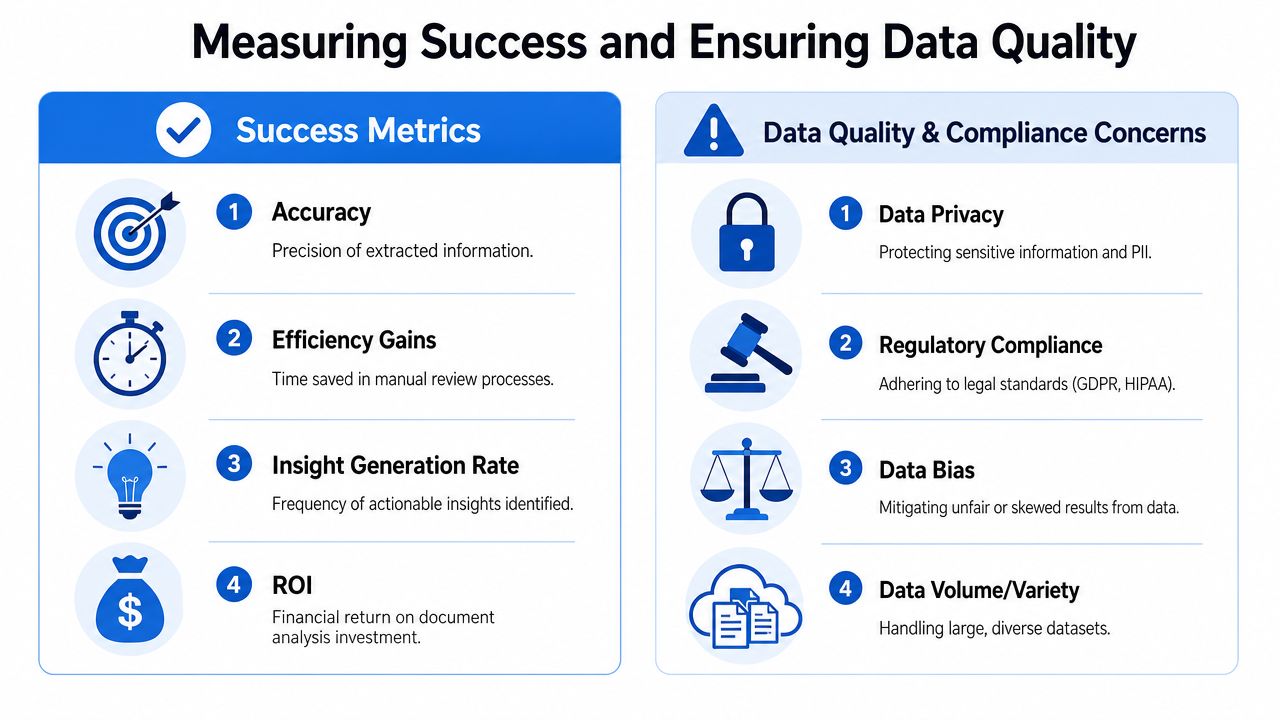
A practical scorecard includes:
- Field precision to see whether extracted values are correct when the system provides them
- Field coverage to see whether the system misses important values
- Source traceability to confirm that users can verify outputs against the original document
- Workflow impact to judge whether the process reduces manual work or improves reporting confidence
This is especially relevant if the extracted output feeds high-stakes systems. If a renewal date is wrong, customer success may mistime outreach. If invoice data is incomplete, attribution models can drift away from finance reality.
A useful companion resource on the operational side is this guide to improving conversion data quality, because the same discipline applies here. Clean downstream reporting depends on clean upstream capture.
Use old-school source criticism in a modern system
There's a helpful lesson from historical research. Historians evaluate documents by testing trustworthiness through criteria such as relevance, recency, validity, identification, expertise, bias, internal consistency, and external consistency, as outlined in this framework for analyzing historical evidence.
That mindset works surprisingly well for business documents too.
Ask questions like these:
- Relevance. Does this document answer the business question?
- Recency. Is the file current, or has the agreement changed since it was created?
- Validity. Is this the final signed version or an outdated draft?
- Identification. Do you know who authored or approved it?
- Bias. Does the document reflect a sales promise, a legal edit, or a support opinion?
- Consistency. Does it agree with the CRM, billing record, or product data?
Good document analysis doesn't just extract text. It checks whether the text deserves to be trusted.
A crawl walk run model for trust
A simple rollout model keeps quality under control.
Crawl. Start with one low-volume, high-value document type, like signed contracts or invoices. Keep a human in the loop and compare outputs against known records.
Walk. Add workflow rules. Route uncertain fields to review, log source citations, and map validated fields into the CRM or warehouse.
Run. Expand to broader document sets like onboarding notes, support exports, or procurement materials. At this stage, you can layer in automation, but only for fields where the validation history supports it.
That sequence is slower than a big-bang rollout. It's also far more likely to produce data your revenue team will trust.
How to Get Started with Document Analysis
Frequently, teams don't need a massive transformation plan. They need a starting point that's small enough to manage and important enough to matter.
Choose one narrow workflow first
Pick a document type that creates regular friction and has a clear downstream use. Good first candidates include signed contracts, invoices, inbound lead attachments, or onboarding notes.
The best starter project usually has three qualities:
- Clear business value because the extracted data supports reporting, routing, or forecasting
- Repeatable format because similar documents make setup easier
- Visible pain because manual work already exists and people want it gone
If your rev ops manager already spends time copying contract dates into Salesforce, that's a strong candidate. If finance manually matches invoice details to account records, that's another.
Pick tools based on how the data will be used
Different tools fit different stages of maturity.
- Standalone platforms work well when the main need is reading, searching, and summarizing documents quickly.
- API-first tools fit teams that want extracted fields pushed into a CRM, warehouse, or internal service.
- Embedded features inside systems like e-signature, billing, or support platforms can help when the document process already lives there.
The key question isn't “Which AI tool is best?” It's “Where should this extracted data go next?”
If the answer is “a human needs to review the source first,” prioritize usability and citation. If the answer is “this should enrich account records,” prioritize structured extraction and integration.
Build momentum with one visible win
A good first launch isn't flashy. It's obvious.
Take one workflow, define the fields you care about, validate the outputs, and show the impact. Maybe sales gets cleaner contract dates. Maybe marketing gets more reliable account enrichment. Maybe finance spends less time reconciling records.
Once one workflow proves useful, the second is easier to justify. The team already understands the pattern: collect, analyze, validate, structure, sync.
Document analysis works best when it stops being viewed as a side project and starts being treated like a core part of your data pipeline. For B2B SaaS teams, that shift can turn forgotten files into a real strategic asset.
If you're trying to connect document-derived signals with pipeline, revenue, and customer journey data in one place, Cometly helps B2B SaaS teams unify marketing, sales, and product data into a trusted attribution layer that syncs with CRM and warehouse systems. You can explore the platform at Cometly.