
Table of Contents
- The Hidden Cost of Unplanned Work
- What Is Work Planning Really Beyond the To-Do List
- The 6 Core Components of an Effective Work Plan
- Common Frameworks and Processes for Work Planning
- Measuring What Matters Outcomes and KPIs for Work Plans
- How Modern Tools and AI Accelerate Work Planning
- Best Practices for High-Performing Teams and Pitfalls to Avoid
The Hidden Cost of Unplanned Work
A product team starts Monday with a clear sprint goal. By Tuesday, sales needs a customer-specific tweak, support reports a bug from a key account, and an executive asks for an update on a different feature.
By Thursday, engineers have touched four priorities and finished none. The roadmap still exists, but daily work no longer matches it.
That pattern feels familiar because unplanned work rarely looks dramatic at first. It shows up as constant context switching, half-scoped projects, meetings that reset priorities, and delivery dates that keep moving.
The cost goes beyond a missed deadline. Teams lose momentum, product managers spend more time re-explaining than deciding, and shipped features solve the loudest request instead of the right problem.
That is why the answer to what is work planning needs to go beyond a task list. A work plan gives teams a shared way to connect company goals, current scope, available capacity, and likely risks before the week gets hijacked.
In practice, work planning acts like an operating system for delivery. It creates enough structure to protect focus while leaving room for changes that deserve attention.
The wider market is moving in the same direction. While on-premise workforce management solutions held a significant market share in 2025, that lead is shrinking as teams move toward cloud-based systems built for faster, more connected planning workflows. Learn more in this workforce management market research.
For teams dealing with interrupts every week, planning also has to account for work that cannot be predicted in advance. You might be interested in Linear’s guide on planning for unplanned work.
What Is Work Planning Really Beyond the To-Do List
A task list answers one narrow question: what should we do next. Work planning answers a harder one: what should this team work on, in what order, with which people, and for what business outcome.
That difference changes how a team operates.
An architect does not begin a skyscraper by handing workers a pile of daily chores. The blueprint sets the purpose of the building, its constraints, the order of construction, the load each part must carry, and the tradeoffs that keep the whole structure sound.
Work planning serves the same role for product and engineering teams. It is the blueprint for execution, not a stack of tickets.
To make that concrete, this short video gives a useful visual frame for how planned work connects strategy and delivery.
In practice, that means a work plan starts before anyone opens the backlog. A team first defines the outcome it wants, such as reducing onboarding friction or improving reliability for a high-value workflow.
From there, the plan adds shape. It defines scope, sequences the work, assigns ownership, accounts for capacity, and marks the risks that could stall delivery.
A to-do list cannot do that job. It can remind an engineer to build an API endpoint today, but it cannot explain why that endpoint matters, what depends on it, or what gets pushed back if the team takes on one more request.
The infographic below maps that idea into three parts: blueprint, foundation, and structure.
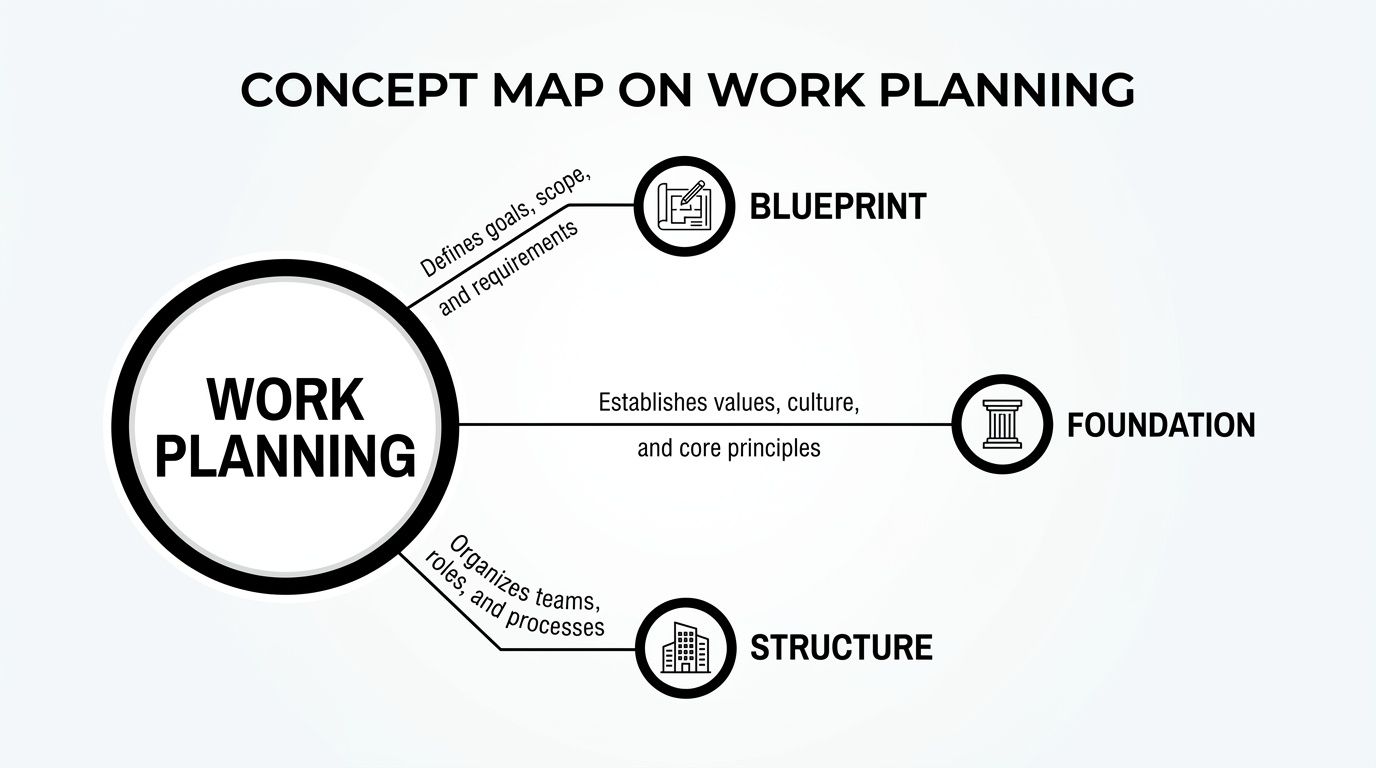
The key insight is that good planning starts with a blueprint, rests on a stable foundation, and only then turns into visible output.
For a software team, the pattern usually looks like this:
- Blueprint means goals, priorities, and success criteria
- Foundation means scope, staffing, dependencies, and timing
- Structure means the actual issues, milestones, reviews, and releases
Each layer matters because daily execution inherits its shape from earlier planning choices. If the blueprint is vague, teams ship busy work. If the foundation is weak, even strong execution starts to wobble.
So, what is work planning in practical terms? It is a living system that keeps strategy, resources, and delivery aligned as conditions change.
That is why strong teams revisit plans often. They update assumptions, move work around, and protect the goal even when the exact path needs to shift.
The 6 Core Components of an Effective Work Plan
Once you move past the basic question of what is work planning, the next question is practical: what makes a plan strong enough to guide real delivery work.
A useful work plan has six parts working together. Remove one, and the plan may still look organized on paper, but it starts to fail under pressure.
Goals come first because they define the result the team is trying to create. For a product squad, that might mean improving trial-to-paid conversion or cutting failed checkout sessions, not just “shipping onboarding improvements.”
That distinction shapes every decision that follows. A team with a clear goal can reject busy work faster because the standard is no longer activity, it is progress toward a stated outcome.
From there, scope sets the boundary line. It answers what the team will build, what it will postpone, and what falls outside the current effort.
In software teams, scope is where many plans begin to drift. A feature that starts as “improve search” can swell into new filters, saved views, ranking changes, and analytics unless someone defines the edge of the work early.
The next component is the backlog, which turns broad intent into reviewable pieces of work. A healthy backlog is not a storage bin for every request; it is a ranked set of options the team can pull from with context attached.
For example, a backlog item for search might include user pain, technical notes, dependencies, and a reason for priority. That gives engineers and product managers something better than a vague title in a queue.
Then comes scheduling, which adds sequence and timing. This does not mean predicting every day with perfect accuracy; it means deciding what should happen first, what can run in parallel, and what has to wait.
This is also where good plans become more reliable through smaller units of work. For technical projects, teams estimate more accurately when they break features into the smallest testable sub-features rather than sizing one large block at once. For technical work, this granular approach can significantly improve estimation accuracy. Read the full breakdown in this technical specification guide for feature development.
After timing, the plan needs resource allocation. That means matching the work to the people, skills, and available capacity needed to finish it.
A backend-heavy project staffed with mostly frontend capacity will slip even if the schedule looks reasonable. The same problem appears when senior engineers are spread across too many initiatives and become approval bottlenecks for architecture decisions.
The final component is risk management, which keeps the plan honest. Every software project carries uncertainty, whether that is an external API dependency, a migration that may take longer than expected, or a compliance review that could block release.
Strong plans do not pretend those risks are minor. They mark them early, assign owners, and create fallback paths before the team is already late.
You can see the six components as one connected chain:
- Goals define success
- Scope protects focus
- Backlog organizes candidate work
- Scheduling creates order
- Resource allocation matches effort to capacity
- Risk management protects delivery
In practice, these parts influence one another constantly. If risk rises, schedule changes. If staffing changes, scope may need to shrink. If goals shift, the backlog should be reordered rather than padded with old assumptions.
That is why an effective work plan is less like a frozen document and more like a well-built frame. It gives the team structure, absorbs change, and keeps daily execution tied to the result that matters.
Common Frameworks and Processes for Work Planning
Once the parts of a plan are clear, the next question is operational: how does that plan move through time.
This is where many teams get stuck when answering what is work planning. They have goals, scope, and a backlog, but they mix long-range planning tools with short-range execution tools and expect one document to do every job.
A roadmap works best at the direction level. It sets the themes, bets, and sequence for a quarter or half-year, such as improving onboarding first, then reliability, then enterprise controls.
A roadmap should stay broad on purpose. If it gets packed with task-level detail, it stops guiding decisions and starts aging the moment priorities shift.
A PRD sits one level lower. It translates one roadmap item into a concrete proposal by clarifying the problem, the user, the expected behavior, constraints, and what success looks like.
In practice, the roadmap says where the team is going. The PRD explains what a specific stop on that path needs to include.
Execution frameworks solve a different problem. They decide how work gets pulled, shaped, and reviewed week by week.
For many software teams, sprints are the familiar model. A sprint is time-boxed, often one or two weeks, and the team commits to a fixed set of work for that window.
That structure helps when cadence matters more than flexibility. Teams that need regular ceremonies, predictable demos, and a steady shipping rhythm often work well in sprints, especially if priorities stay fairly stable during the sprint.
However, sprint planning can get awkward when urgent work arrives often. The calendar keeps moving even if the original batch of work was scoped poorly, blocked by dependencies, or interrupted by incidents.
Cycles address that problem from the other side. A cycle is scope-boxed rather than time-boxed in spirit, which means the emphasis shifts from filling a calendar slot to selecting a realistic amount of work that can move cleanly together.
That model fits product and engineering teams that want tighter focus, smaller batches, and fewer promises made too early. It is especially useful when the team ships continuously and wants planning to reflect actual capacity rather than meeting cadence.
A simple example shows how these frameworks can work together.
A roadmap might set a quarterly priority to improve team onboarding. The PRD defines the feature set, such as invite flows, permission defaults, and first-run guidance. The cycle or sprint then turns that feature into the next set of issues engineers can complete and review.
The decision is less about which framework is best in the abstract and more about which planning constraint fits your work.
Use roadmaps when you need strategic sequencing across months. Use PRDs when a feature needs shared understanding before implementation. Use sprints when fixed time windows help coordination. Use cycles when controlled scope and continuous adjustment fit the team better.
Effective work planning mitigates risks by defining clear milestones and using prioritization frameworks like MoSCoW. Implementing milestone gating can reduce the need for project rollbacks by as much as 40%, as it enforces incremental validation and prevents scope creep. Learn more in this practical guide to writing technical specs on Stack Overflow’s blog.
That is why strong teams rarely rely on one artifact alone. They use a roadmap to hold direction, a PRD to sharpen the problem, and an execution model that matches how the team builds.
If your team is moving away from rigid planning windows, you might be interested in Linear’s article on continuous planning for modern product teams.
Measuring What Matters Outcomes and KPIs for Work Plans
A work plan is only as good as the results it produces. If a team closes a large batch of tickets but cycle time keeps rising and customers feel no improvement, the plan looked busy and performed poorly.
That distinction matters because outputs are easy to count, while outcomes show whether the plan improved delivery.
For example, “42 issues closed” sounds productive. It says nothing about whether the team finished the right work, reduced delays, or shipped something users valued.
The screenshot below shows how a modern planning system surfaces trends such as throughput, cycle time, and workload across the team.

The key takeaway is that healthy planning shows up as stable flow and visible constraints, not a flattering count of completed tasks.
If you are trying to answer what is work planning in practical terms, this is part of the answer: it is a way to shape work so the team can improve measurable outcomes over time.
Three KPIs are especially useful because they expose different planning failures.
- Cycle Time shows how long work takes from start to finish
- Velocity shows how much validated work a team completes in a planning period
- Team Load shows whether work is distributed in a sustainable way
Cycle Time is often the clearest signal. When it grows, the problem is rarely “people need to work faster.” The issue is usually oversized tickets, blocked dependencies, too many parallel tasks, or unclear review paths.
Velocity helps with forecasting, but only when used carefully. A rising velocity number is helpful if quality holds and priorities stay aligned; it is misleading if teams split work into tiny tasks just to make the chart look better.
Team Load keeps planning grounded in capacity. If one engineer owns every risky migration or every final approval, the plan may look balanced on paper while execution stalls around a single bottleneck.
In practice, these metrics work better as a pattern than as isolated numbers. A team with flat velocity, rising cycle time, and uneven load does not need more motivation; it needs a different plan.
Poor visibility is often the larger failure. While many projects fail due to timeline issues, a 2025 CHAOS Report from the Standish Group shows a significant percentage fail due to poor visibility into execution risks. Modern tools that offer predictive KPIs and structural diffs have improved project success rates in enterprise pilots by forecasting bottlenecks before they derail a plan. Learn more in this work plan research summary and KPI findings.
That shift from historical reporting to predictive insight changes how teams plan. Instead of asking why the last cycle slipped, leaders can spot warning signs early, adjust scope, rebalance ownership, and protect the goal before the plan breaks.
That is how metrics become useful. They should help product and engineering teams debug the system, not decorate it.
How Modern Tools and AI Accelerate Work Planning
Work planning used to happen in batches. A team wrote the PRD, split the work, filled the sprint, and hoped the plan would survive the next round of customer requests, bugs, and technical surprises.
Modern tools change that rhythm. They turn planning into a continuous system where intake, prioritization, execution, and review live in the same place.
This matters most for product and engineering teams because their plans rarely fail at the idea stage. They fail in the handoff between strategy, backlog, and daily execution.
To see that shift more clearly, this image captures the kind of connected collaboration modern planning tools support.

A modern planning platform closes those gaps. Customer feedback can enter the system as raw input, get grouped into patterns, turn into prioritized issues, and roll up into an initiative without someone copying the same context across four separate tools.
That changes the answer to what is work planning in a practical sense. It is no longer a document created before work starts; it is an active operating layer that keeps the plan current as work moves.
AI strengthens that model because it helps at each stage, not just at the writing stage. A product manager can start with rough notes and get a first PRD draft, while incoming feedback can be sorted into related themes and engineers can move faster from approved issue to implementation.
In practice, the win is not “AI wrote something.” The win is that teams spend less time translating information between systems and more time making decisions with shared context.
A common example is feature discovery. Support conversations, sales requests, and bug reports often point to the same underlying problem, but they arrive in different formats and at different times.
With automation and AI-native triage, that scattered intake can be turned into one visible planning signal. Product leads can compare it against roadmap goals, engineering can assess the effort, and the backlog stays tied to real demand instead of whoever spoke last.
The same pattern applies to execution. Once a team approves the work, connected systems can link issues to code changes, route reviews, and keep status current without asking every contributor to update three places by hand.
That reduces planning drag. It also improves trust in the plan because the plan reflects what is happening now, not what someone remembered to update yesterday.
There is also a noticeable shift underway. Tools that use AI for auto-triage, PRD drafting, and code generation can significantly reduce planning and execution cycles, a key advantage given the increasing adoption of AI-assisted dev tools. Read the full research about modern work planning and AI-assisted execution.
Linear fits this model because it connects planning and delivery in one environment rather than treating planning as a separate admin layer. Teams can move from initiative to issue to shipped change with less friction, and AI can assist with drafting, organization, and developer workflows along the way.
For teams evaluating that approach, Linear’s documentation on AI workflows for planning, issue triage, and software delivery shows how native AI support works inside the product.
The larger takeaway is straightforward. Good tools do not replace judgment, prioritization, or product thinking.
They remove the mechanical work around those decisions. That is why modern work planning feels lighter, faster, and more accurate than the static planning process many teams still struggle to maintain.
Best Practices for High-Performing Teams and Pitfalls to Avoid
Strong work planning shows up in small weekly habits. Product and engineering leads do better when they treat the plan as a working system, not a document that gets polished once and ignored later.
One rule helps more than it sounds: keep goals firm and plans flexible. The outcome should stay stable, while scope, sequencing, and staffing can change as new information arrives.
For example, a team may keep the goal of improving activation while swapping out one risky feature for two smaller changes that can ship sooner. That preserves direction without locking the team into a weak path.
The next habit is shared planning. A plan built only by one manager often misses technical constraints, hidden dependencies, and support issues that surface after work starts.
In practice, the best planning meetings are short and specific. Product brings the outcome, engineering brings effort and risk, and design or support adds user context that sharpens tradeoffs.
Another practice is to plan at the right level of detail. Teams need enough detail to start confidently, but not so much that they waste time guessing the exact shape of work three weeks too early.
That is a useful way to answer what is work planning for daily operations. It is not prediction for its own sake; it is enough structure to help a team choose well, sequence work, and adapt without losing the goal.
Teams also improve faster when they review the plan against evidence. If cycle time rises, blocked work stacks up, or one engineer becomes the approval bottleneck, the next planning pass should reflect that signal.
Technical debt belongs in that review as well. If planning only rewards new features, reliability work keeps getting deferred until delivery slows across the board.
Use this checklist with your next planning cycle:
- Do set one clear outcome before discussing tasks
- Do involve engineering early in scope and sequencing decisions
- Do leave buffer for interrupts, bugs, and review delays
- Do revisit priorities on a regular cadence and update the plan
- Do reserve visible capacity for maintenance and technical debt
- Do not plan every task in full detail too far ahead
- Do not treat the roadmap or sprint plan as fixed once work starts
- Do not overload senior engineers with every high-risk dependency
- Do not measure plan quality by ticket count alone
- Do not keep adding work without removing something else
A good work plan should make tradeoffs visible. If new work enters, something else moves, shrinks, or waits.
That discipline is what keeps planning useful under pressure. High-performing teams are not the ones with perfect forecasts; they are the ones that adjust early, protect focus, and keep execution tied to outcomes.
Linear helps teams turn these practices into a repeatable workflow, from planning and prioritization to execution and review. Explore the product at Linear.